
في معظم ورش تصنيع الآلات، تظهر تجاويف متشابهة في العديد من القطع المختلفة. تُدخل قطعة معدنية مسطحة إلى آلة التفريز، وبعد دقائق قليلة، يتم حفر تجويف نظيف ودقيق فيها. قد يحتوي هذا التجويف على مكونات إلكترونية، أو يُستخدم لتقليل الوزن، أو لاحتواء محمل، أو ببساطة لإزالة المواد غير الضرورية.
تُعرف هذه العملية باسم "التفريز الجيبي"، ورغم بساطتها الظاهرية، إلا أنها من العمليات التي تبرز فيها أهمية الاستراتيجية واختيار مسار الأداة والانضباط في التشغيل. تُستخدم عمليات التفريز الجيبي باستخدام الحاسوب (CNC) على نطاق واسع في عمليات التفريز باستخدام الحاسوب لإنشاء تجاويف غائرة وميزات داخلية.
تؤدي استراتيجيات الجيب غير الفعالة إلى إهدار ساعات من وقت تشغيل الآلة، وتلف الأدوات، وترك أرضيات قبيحة تحتاج إلى إعادة تشكيل. في المقابل، يزيل الجيب المصمم جيدًا المواد بكفاءة مع الحفاظ على انخفاض تآكل الأدوات ودقة الأبعاد عالية.
في هذا الدليل، سنشرح بالتفصيل ما هو طحن الجيوب في الواقع، ومتى يتم استخدامه، وكيف يتعامل معه الميكانيكيون للحفاظ على دقة الأجزاء وسهولة الإنتاج.
الطحن الجيبي هوالتصنيع باستخدام الحاسوب (CNC)عملية إزالة المواد من داخل حدود محددة لإنشاء تجاويف غائرة داخل قطعة ما. فبدلاً من القطع على طول حافة أو شكل خارجي، تتحرك أداة القطع داخل المادة لتنظيف منطقة داخلية.
سترى عملية طحن الجيوب مستخدمة في كل مكان، من مكونات الفضاء الجوي خفيفة الوزن إلى الهياكل الإلكترونية وتجاويف القوالب.
الخصائص الرئيسية لعملية تشكيل الجيوب باستخدام الحاسوب (CNC):
● يُنشئ تجاويف داخلية أو مناطق غائرة داخل القطعة بدلاً من قطع الحواف الخارجية
● يستخدم مسارات أدوات مضبوطة لإزالة المواد تدريجياً مع الحفاظ على دقة الأبعاد
● يمكن أن تتضمن جيوبًا ذات قاع مسطح، أو جيوبًا متدرجة، أو جيوبًا محددة الشكل، وذلك حسب التصميم.
● غالباً ما يتطلب الأمر عمليات تجليخ وتنعيم لتحقيق التوازن بين السرعة وجودة السطح
● يعمل مع العديد من مواد التشغيل الشائعة، بما في ذلك:
○ سبائك الألومنيوم
○ الفولاذ المقاوم للصدأ
○ الفولاذ الكربوني
○ النحاس الأصفر والنحاس الأحمر
○ البلاستيك الهندسي مثل النايلون أو البولي أوكسي ميثيلين
بمعنى آخر، عندما يتضمن تصميم جزء ما منطقة مجوفة بجدران محددة وأرضية، فإن عملية طحن الجيوب عادة ما تكون استراتيجية التشغيل التي تجعل ذلك ممكناً.
عادة ما يتم تصنيف عمليات طحن الجيوب حسب كيفية تحديد حدود الجيب بالنسبة لقطعة العمل.
تحدد هذه الحدود كيفية قيام برنامج CAM بإنشاء مسارات الأدوات وكيفية دخول أداة القطع في المادة.
من الناحية العملية، تندرج معظم تجاويف CNC ضمن ثلاث فئات هيكلية: تجاويف مغلقة، تجاويف مفتوحة، تجاويف ذات جزر.
الجيب المغلق محاط بمادة من جميع جوانبه. تقع حدود الجيب بالكامل داخل هندسة الجزء.
هذا هو النوع الأكثر شيوعًا من الجيوب في عمليات التفريز باستخدام الحاسوب (CNC). وتشمل الأمثلة النموذجية الهياكل المجوفة، وتجاويف التثبيت، والعلب الإلكترونية.
صفات:
● جميع جدران الجيب داخلية للجزء
● يجب أن تدخل أداة القطع من خلال منحدر، أو استيفاء حلزوني، أو مدخل محفور مسبقًا
● قد يصبح إخراج الرقائق صعباً في التجاويف العميقة
● عادةً ما تكون عمليات التخشين والتشطيب مطلوبة
تُستخدم الجيوب المغلقة بشكل متكرر في:
● أغلفة إلكترونية
● لوحات التثبيت
● تجاويف القوالب
● مكونات هيكلية خفيفة الوزن
نظراً لأن الحدود مغلقة بالكامل، فإن أنظمة التصنيع بمساعدة الحاسوب (CAM) تتعامل معها كمنطقة تشغيل مغلقة وتولد مسارات أدوات التنظيف داخل التجويف.
يحتوي الجيب المفتوح على جانب واحد على الأقل يتقاطع مع الحافة الخارجية لقطعة العمل.
بدلاً من أن يكون التجويف مغلقاً بالكامل، يكون مفتوحاً جزئياً على الجزء الخارجي. في العديد من التصاميم، يبدو هذا أشبه بدرجة أو رف غائر منه بتجويف تقليدي.
ومن الأمثلة الشائعة ما يلي:
● فتحات لتخفيف الوزن
● قنوات الوصول الجانبية
● فتحات مفتوحة أو ميزات متدرجة
تختلف سلوكيات الجيوب المفتوحة أثناء عملية التصنيع:
● تخرج الرقائق بسهولة أكبر لأن التجويف مفتوح
● يمكن للأداة في كثير من الأحيان الدخول من الجانب بدلاً من الصعود عمودياً
● قد يتغير مستوى الاشتباك فجأة بالقرب من الحدود المفتوحة
لهذا السبب، غالبًا ما يقوم برنامج CAM بإنشاء مسارات أدوات تبدأ من خارج الجزء وتتحرك إلى الداخل، مما يقلل من حمل الأداة أثناء الدخول.
يحتوي الجيب ذو الجزيرة على هندسة داخلية يجب أن تبقى دون تشكيل.
الجزيرة عبارة عن نتوء بارز داخل التجويف. أثناء عملية طحن الجيوب، يجب على أداة القطع إزالة المواد المحيطة مع الحفاظ على هذه المنطقة الداخلية.
تشمل السمات النموذجية للجزيرة ما يلي:
● نتوءات لتركيب البراغي
● أعمدة المحاذاة
● أضلاع هيكلية داخل الهياكل
يتطلب تشكيل الجيوب ذات الجزر تخطيطًا أكثر تعقيدًا لمسار الأداة لأن القاطع يجب أن:
● مواد واضحة حول حدود متعددة
● تجنب الاصطدام بهندسة الجزيرة
● الحفاظ على استخدام الأدوات بشكل مستمر
تقوم أنظمة التصنيع بمساعدة الحاسوب الحديثة بالكشف التلقائي عن المناطق المغلقة ومعاملتها كجزر، مما يؤدي إلى إنشاء مسارات أدوات تتحرك حول هذه الميزات الداخلية مع إزالة المواد المحيطة.
في الأجزاء المعقدة، قد يحتوي الجيب الواحد على جزر متعددة، أو قد تحتوي الجزر على جيوب داخلية أصغر.
ضمن هذه الفئات الهيكلية، يمكن أن تتخذ الجيوب أشكالاً هندسية عديدة، بما في ذلك:
● جيوب مستطيلة
● جيوب دائرية
● تجاويف غير منتظمة أو حرة الشكل
تُعد الأشكال المنتظمة، مثل المستطيلات أو الدوائر، أسهل في البرمجة يدويًا، بينما تعتمد الجيوب غير المنتظمة عادةً على مسارات الأدوات التي يتم إنشاؤها بواسطة CAM.
في عمليات CNC الحديثة، يكون لهيكل الجيب (مفتوح، مغلق، جزيرة) تأثير أكبر على استراتيجية التشغيل الآلي من الشكل الدقيق للتجويف.
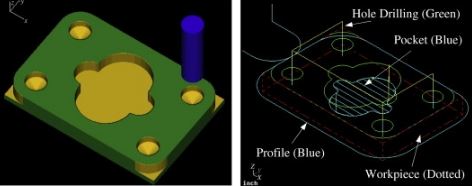
لا يمثل شكل التجويف سوى نصف الحكاية. فاستراتيجية مسار الأداة هي التي تحدد مدى كفاءة أداة القطع في إزالة المواد ومقدار الضغط الواقع عليها.
قد يختلف وقت دورة برنامجين يقومان بقطع نفس التجويف اختلافًا كبيرًا، وذلك تبعًا لكيفية توليد برنامج التصنيع بمساعدة الحاسوب (CAM) للمسار. تركز بعض الاستراتيجيات على السرعة، بينما تركز أخرى على عمر الأداة أو جودة السطح.
عادةً ما تجمع عمليات الطحن الجيدة باستخدام الحاسوب (CNC) بين استراتيجيات متعددة بدلاً من الاعتماد على تمريرة واحدة.
تتم عملية تشكيل الجيوب باستخدام الحاسوب (CNC) عادةً على مرحلتين: التخشين والتشطيب.
تُزال معظم المواد في مرحلة التخشين. والهدف ليس الدقة التامة، بل إزالة الجزء الأكبر من المادة بسرعة مع ترك هامش صغير للتشطيب.
أثناء عملية التخشين، يترك المبرمجون عادةً ما بين 0.2 و 0.5 مم من المادة على جدران وأرضيات الجيوب. تضمن هذه المادة المتبقية أن تكون عملية التشطيب نظيفة بدلاً من احتكاكها بالسطح.
تأتي مرحلة التشطيب لاحقاً. يقوم القاطع بإزالة المادة المتبقية بتمريرة أخف، مما ينتج عنه جودة السطح النهائية والدقة الأبعاد.
بدون عملية تشطيب مناسبة، غالباً ما تظهر على جدران الجيوب علامات أدوات واضحة وأبعاد غير متناسقة.
توفر أنظمة التصنيع بمساعدة الحاسوب الحديثة العديد من استراتيجيات تشكيل الجيوب باستخدام التحكم الرقمي الحاسوبي، كل منها مناسب لظروف تشغيل مختلفة.
تُزيل عملية التثقيب على مستوى Z المواد طبقة تلو الأخرى من الأعلى إلى الأسفل. إنها عملية بسيطة ويمكن التنبؤ بها، ولكنها قد تُسبب تداخلًا مفاجئًا للأداة في الزوايا.
تعمل تقنية التجويف الحلزوني على تحريك أداة القطع تدريجياً إلى الداخل أو الخارج في مسار متصل. وهذا يقلل من التغيرات المفاجئة في الاتجاه، وغالباً ما يحسن من جودة السطح.
تعتبر عملية الطحن الحلقي استراتيجية متقدمة أخرى لتشكيل الجيوب حيث تتبع أداة القطع مسارات دائرية حلقية للحفاظ على التعشيق المتسق وتقليل حمل الأداة.
تحافظ عملية التنظيف التكيفي (وتسمى أيضاً الطحن الديناميكي) على ثبات تلامس أداة القطع طوال عملية القطع. فبدلاً من التغييرات الحادة في الاتجاه، تتحرك الأداة على طول مسارات سلسة وانسيابية تحافظ على قوى قطع ثابتة.
في العديد من ورش العمل اليوم، تُستخدم استراتيجيات تكيفية للتشطيب الأولي، يليها تمرير محيطي أخف لإنهاء جدران الجيوب.
نقدم للمهندسين الذين يحتاجون إلى عمليات تصنيع معقدة للتجاويف بدقة عالية موثوقة، الطحن باستخدام الحاسوب عبر الإنترنت مع إمكانية تحويل 3 محاور إلى 5 محاور وسرعة في إنجاز الإنتاج.
 اشترك في النشرة الإخبارية لدينا
WHATSAPP : +86-15375471059
البريد الإلكتروني : allan@safekeso.com
رقم الهاتف : +86 15375471059